Start with a job.
Add the job details and a useful task list. Bring in the people who need to use it, with up to five people including the company owner.
 run my works.
RMW Free Starter
Three active jobs. One shared place for drawings, tasks and questions. Start with a focused workspace for up to five people and see how Run My Works fits your working day.
Create your Free Starter workspace with no card required. Sign in with your own email, then add your company and first job.
Start with the work
A small construction job still creates plenty of detail: a plan revision, a question from site, a task that needs a name against it. Free Starter brings a focused set of project tools into one company workspace, so you can try a clear, repeatable way of keeping track.
Add the job details and a useful task list. Bring in the people who need to use it, with up to five people including the company owner.
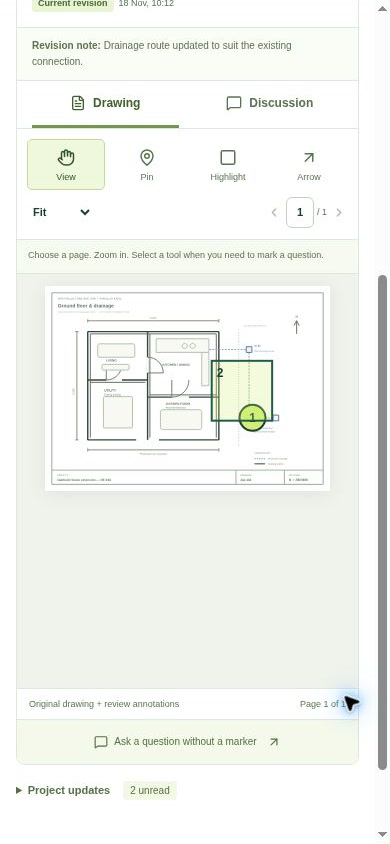
Upload the drawing you are discussing. Add an annotation or comment with enough detail for someone else to understand the question, and keep revisions with the drawing.
Follow the discussion, check notifications and record the next action. A reply and a saved status make it easier to see what still needs attention.
A clear starting allowance
A small workspace to get a real job organised. The allowance below keeps the first step simple; extra capacity or broader team features can be discussed separately.
Free Starter setup requires a signed-in account. Paid Team signup remains closed while the existing launch checks are completed.
More ways to check the plan
Free Starter includes comparison of saved PDF and image revisions, with page mapping and aligned overlays. Calibrate a known dimension to record manual distance or area measurements, each tied to its original page and reference. Drawing tools also include a bounded local IFC inspector; selected models stay on your device.
Measurements depend on the reference you check. They are not automated quantity take-off. The IFC inspector does not provide shared or federated BIM.
Make the first project useful
When the work grows
Free Starter focuses on a small team and three active jobs. RMW’s broader Team workflows cover areas such as time records, job sheets, reporting and team administration. Optional modules have their own scope and pricing.
Team’s approved introductory rate is £49 + VAT per month including three users, plus £8 + VAT per extra user. Paid signup is not open. Ask about the access you need before a paid service starts. Creating an enquiry does not reserve a subscription or activate a paid module.
Before you start
It is a starting point for builders, small contractors and site teams who want to organise three active jobs with up to five people. If you need more than three active jobs, more people or broader office workflows, ask about the right access for your company.
Yes. Start free, sign in with your own email and follow the company setup steps. Choose Free Starter to create your £0 workspace. No card or paid subscription is required. If you already have an account, use it to sign in.
RMW runs in a responsive web browser on a phone, tablet or computer. An internet connection is needed to load and save these workspace records. You can add the web app to your home screen for easy access; an app-store download is not required.
Contact RMW to discuss the access you need. Free Starter does not automatically become a paid subscription. Approved introductory Team rates and optional module pricing are shown in the main pricing section. Paid signup and upgrades are not open.
No. Comments, annotations and status changes are project records. They do not replace a designer’s instruction, engineering approval, a site inspection or the checks required for your work. Confirm decisions with the appropriate competent person before acting on them.
No. Free Starter covers the allowance and core project tools listed above. Broader Team workflows and optional modules are separate. The app shows your company’s current plan and access during setup.
Create your free company workspace, add the first job and invite the people who need it.